Short for isolation work, long for heavy compounds. Set once, remembered.
Rest timer
Rest without staring at your phone.
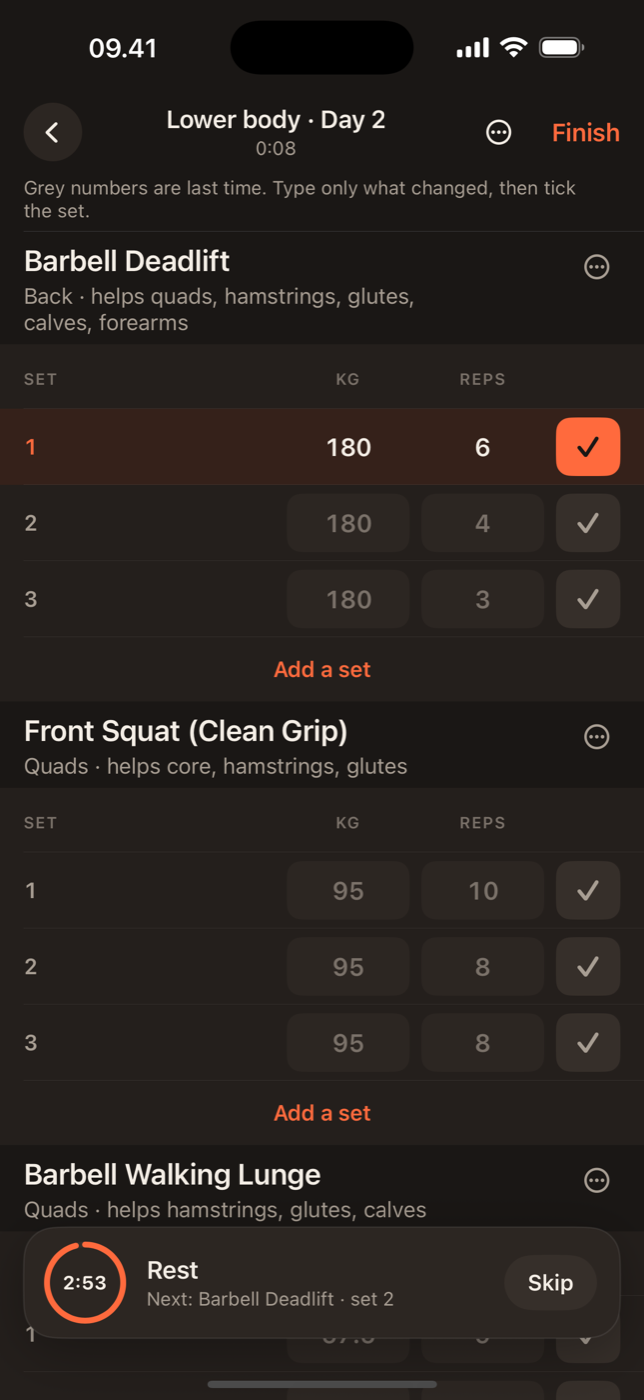
The rest timer starts itself when you tick a set. Lock your phone and it is still there, counting down on the lock screen and in the Dynamic Island. When time is up you feel it, so you can look at the room instead of the clock.
Starts on the tickLock screen Live ActivityNudge when time is up
Why the timer lives outside the app
Most rest timers stop being useful the moment you lock your phone or open a message. Lift runs the timer as a Live Activity, the same system iOS uses for a food delivery or a flight. It appears on the lock screen and in the Dynamic Island, keeps counting while Lift is in the background, and does not depend on the app staying open.
It starts when the set ends
Tick a set in the workout log and the countdown begins. No separate button. The default rest length is yours to set, and each exercise can override it: ninety seconds for curls, three minutes for squats. Tap the timer to add thirty seconds or skip the rest when the rack is about to be taken.
When it hits zero
You get a notification with a short haptic, so the phone in your pocket is enough. The Live Activity shows the next set with the weight and reps prefilled, so you know what you are walking back to before you unlock.
A session that survives interruptions
A live session in Lift is written to disk as you go. Take a call, switch apps, or let the screen go dark for ten minutes and the session, the current exercise and the timer are exactly where you left them. If the timer expired while you were away, the notification is waiting and the next set is ready.
Works with the rest of Lift
Rest time is part of the session record, so the summary shows how long you trained and how much of that was rest. Over a training block that is a useful number: shorter rests with the same weights is progress too. If you track heart rate with an Apple Watch, the rest periods are where you see it recover.

In practice
Rest, handled.
Live Activity on every iPhone running iOS 17; in the Dynamic Island on iPhone 14 Pro and later.
A nudge, not an alarm. Silence it in Settings if the buzz is enough.
More of Lift
Works with everything else.
Lift: Workout & Gym Tracker
Tick the set. Walk away.
The rest timer is in the free version of Lift. No account needed.