
Sessions, volume and the map for each week, side by side.
Web dashboard
Everything from the phone, on a screen you can lean back from.
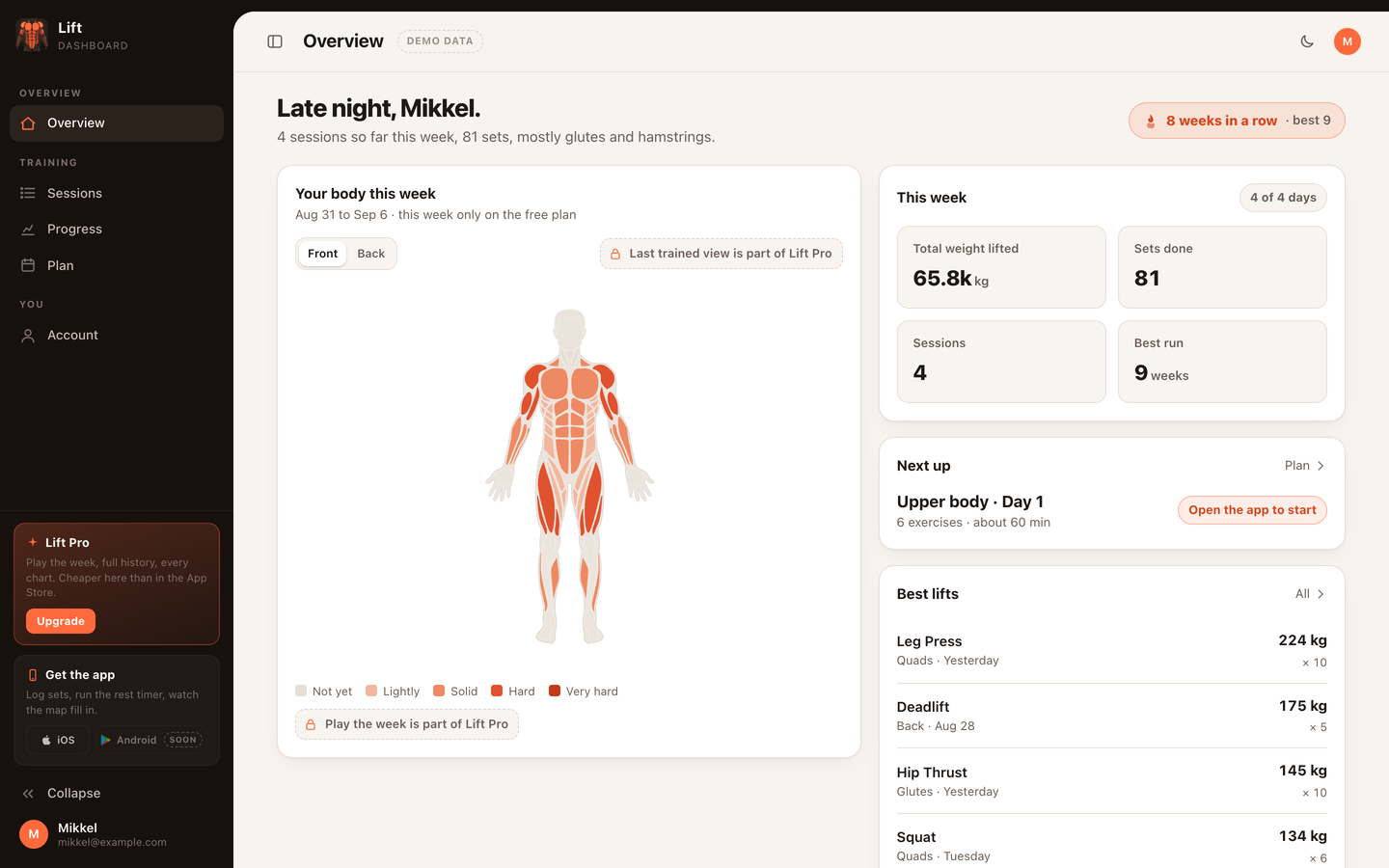
The dashboard is the same account in a browser. Every session, plan and weekly muscle map is there, plus the things a bigger screen is better at: reviewing a month of training, editing plans with a keyboard and managing your subscription.
Any browser, no installSyncs with the iPhone appManage Lift Pro
Signing in
Go to app.lift.productshake.com and sign in with Apple or Google, the same way you sign in on the phone. There is no separate password. The first time you sign in from the app, your existing sessions are uploaded and appear in the dashboard within seconds.
What is on the overview
This week's muscle map, front and back, with the same colours as the phone. Your streak of training weeks, total weight lifted this week against last, and the most recent sessions. Click a session to see every set, the rest times and, if you wore a watch, the heart-rate summary.
Sessions and history
The sessions page lists everything you have ever logged with filters by plan and by month. Open an exercise to see your best lifts and how the weight moved over time. This is the view for planning the next block: a month of history fits on one screen in a way it never does on a phone.
Plans, with a keyboard
Plans sync both ways. Rearrange days, swap exercises and adjust sets on the dashboard and the changes are on your phone before you reach the gym. Bigger edits, like rebuilding a six-day Push/Pull/Legs plan, are simply faster with a keyboard and a wide screen.
Account and billing
The account page shows your Lift Pro status whichever way you paid: subscriptions bought on the web are managed here through Stripe, and App Store subscriptions show as active with a pointer to your Apple ID settings. You can delete your account and all synced data from the same page.
Lift Pro and the web
Sync and the dashboard are part of Lift Pro. Choosing a plan on the pricing page takes you to the dashboard sign-in, opens checkout for that plan, and returns you to the dashboard with Pro active. Open the iPhone app, sign in with the same account, and it unlocks too.

In practice
Better on a big screen.
See your Lift Pro status whichever way you paid, and manage a web subscription through Stripe.
Web subscriptions managed through Stripe; App Store subscriptions shown as active.

Lift: Workout & Gym Tracker
Open the dashboard. Same account, bigger picture.
Sign in with Apple or Google at app.lift.productshake.com.